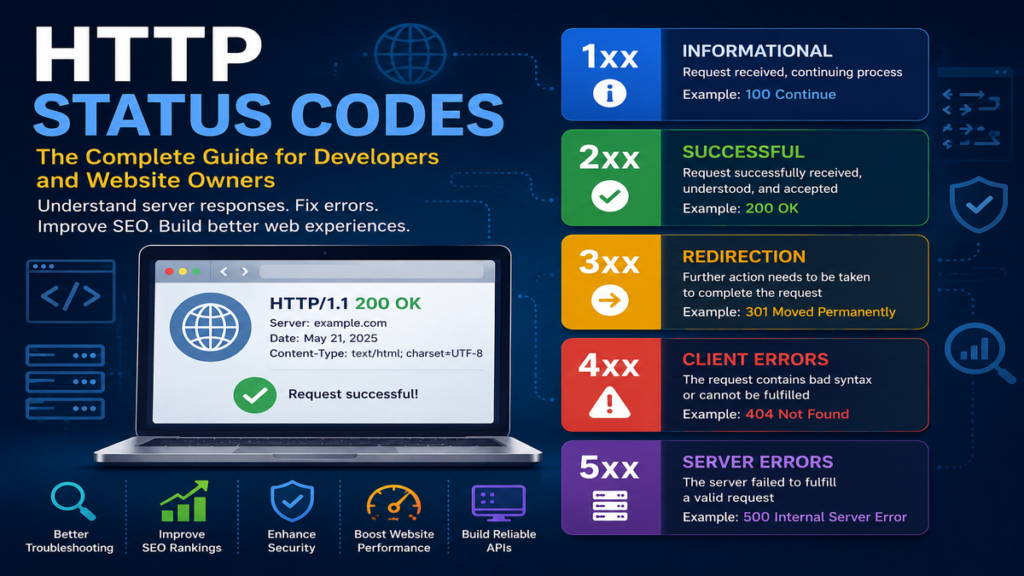
HTTP Status Codes Explained: The Complete Guide for Developers and Website Owners
Every time you visit a website, click a link, submit a form, or access an application programming interface (API), a conversation takes place between your browser and a web server. Although this communication happens in milliseconds and usually remains invisible to users, it follows a standardized language known as the Hypertext Transfer Protocol (HTTP). One of the most important parts of that language is the HTTP status code—a three-digit number returned by the server that explains the outcome of a request. Whether a page loads successfully, redirects to another location, requires authentication, or encounters an error, the HTTP status codes tells browsers, search engines, developers, and monitoring systems exactly what happened.
For website owners and developers, understanding HTTP status codes is essential. These codes influence user experience, search engine optimization (SEO), API integrations, caching behavior, application security, and website performance. A properly configured server returns meaningful responses that help browsers behave correctly and search engines index content efficiently. Conversely, incorrect or unexpected status codes can create broken links, indexing issues, security risks, and frustrated users.
Although most internet users recognize the famous 404 Not Found error, HTTP defines dozens of standardized response codes covering informational messages, successful operations, redirects, client errors, and server failures. Learning how these codes work provides valuable insight into the architecture of the modern web and equips developers, IT professionals, and digital marketers with practical troubleshooting skills.
What Are HTTP Status Codes?
HTTP status codes are standardized numerical responses defined by the Internet Engineering Task Force (IETF) within the HTTP specification. After a client—typically a browser, mobile application, or API consumer—sends a request to a server, the server responds with an HTTP status code indicating whether the request succeeded, requires additional action, or failed. The first digit categorizes the response, while the remaining digits identify a specific condition.
These codes allow computers to communicate efficiently without lengthy explanations. A browser receiving a 200 OK response knows that the requested resource has been delivered successfully, while a 301 Moved Permanently response instructs it to use a different URL. Likewise, a 500 Internal Server Error indicates that something unexpected prevented the server from fulfilling the request.
According to the HTTP Semantics specification published by the IETF (RFC 9110), these status codes form a core component of web communication and ensure consistent behavior across browsers, servers, APIs, and web services.
Why HTTP Status Codes Matter
HTTP status codes are much more than technical messages for developers. They directly influence how websites perform, how users interact with online services, and how search engines evaluate content.
For website owners, proper status codes improve SEO by ensuring search engines understand which pages should be indexed, redirected, or removed. Developers depend on them to diagnose application issues quickly, while API consumers rely on predictable responses to build reliable integrations.
Modern monitoring platforms continuously analyze HTTP responses to detect outages before users notice problems. Security tools also inspect response codes to identify suspicious activity, brute-force login attempts, or misconfigured applications.
Ultimately, every successful website depends on correctly implemented HTTP status codes because they provide the foundation for reliable communication between clients and servers.
“HTTP status codes provide the machine-readable outcome of every HTTP request.” — Internet Engineering Task Force, HTTP Semantics (RFC 9110).
The Five Categories of HTTP Status Codes
Every HTTP response belongs to one of five categories determined by its first digit.
| Category | Range | Purpose | Common Examples |
|---|---|---|---|
| Informational | 100–199 | Request received, continue processing | 100 Continue |
| Successful | 200–299 | Request completed successfully | 200 OK, 201 Created |
| Redirection | 300–399 | Resource moved or additional action required | 301, 302, 304 |
| Client Error | 400–499 | Problem with the client’s request | 400, 401, 403, 404 |
| Server Error | 500–599 | Server failed to complete request | 500, 502, 503 |
This classification allows browsers and applications to react consistently regardless of the specific website or server software involved.
1xx Informational Status Codes
Informational responses indicate that the server has received the request and is continuing to process it. These responses are rarely visible to everyday users because they occur behind the scenes during communication between clients and servers.
Some common informational codes include:
- 100 Continue — The client should continue sending the request body.
- 101 Switching Protocols — The server agrees to switch protocols, often used when upgrading HTTP connections.
- 103 Early Hints — Allows browsers to preload resources before the final response is ready, improving performance.
Although developers encounter these responses less frequently than other status codes, they play an important role in optimizing network communication and reducing latency.
2xx Successful Status Codes
Successful responses indicate that the server processed the request correctly.
Among the most important are:
- 200 OK — The request succeeded.
- 201 Created — A new resource was successfully created.
- 202 Accepted — The request has been accepted but processing will occur later.
- 204 No Content — The server successfully processed the request but returns no content.
- 206 Partial Content — Only part of a resource was delivered, commonly used for streaming media and resumable downloads.
The 200 OK response is the backbone of the web because it confirms successful delivery of webpages, images, scripts, APIs, and other resources.
Understanding 200 OK
When users type a URL into their browser and the requested page loads correctly, the server typically returns HTTP 200 OK. Search engines also prefer this response because it confirms that content is available for crawling and indexing.
For APIs, a 200 response often includes structured JSON or XML data that client applications can immediately process. In e-commerce, successful product pages, checkout confirmations, and search results generally rely on 200 responses to deliver information efficiently.
Developers frequently verify 200 responses during testing because they indicate healthy communication between clients and servers.
3xx Redirection Status Codes
Redirection responses tell clients that the requested resource has moved or that additional action is required before completing the request.
The most common redirect codes include:
| Status Code | Meaning | SEO Impact |
|---|---|---|
| 301 | Moved Permanently | Transfers ranking signals |
| 302 | Found (Temporary Redirect) | Usually temporary |
| 303 | See Other | Redirect after form submission |
| 304 | Not Modified | Enables browser caching |
| 307 | Temporary Redirect | Preserves request method |
| 308 | Permanent Redirect | Permanent redirect while preserving method |
Proper redirects improve user experience by automatically forwarding visitors to the correct content while helping search engines understand changes to website structure.
“Permanent redirects help preserve resource identity across URI changes.” — HTTP Semantics (RFC 9110).
Understanding 4xx Client Error Status Codes
Client error responses indicate that the server successfully received the request but could not fulfill it because something was wrong with the request itself. These errors often result from incorrect URLs, missing authentication credentials, insufficient permissions, malformed requests, or requests for resources that no longer exist.
Unlike server-side failures, 4xx errors usually require action from the client before the request can succeed. Developers frequently encounter these responses during testing, while website owners monitor them closely because excessive client errors can negatively affect user experience and search engine crawling.
Among the dozens of client error codes defined by the HTTP specification, a handful appear far more frequently than others. Understanding what they mean helps developers diagnose problems more quickly and design applications that respond gracefully to invalid requests.
Some of the most common 4xx status codes include:
- 400 Bad Request
- 401 Unauthorized
- 403 Forbidden
- 404 Not Found
- 405 Method Not Allowed
- 408 Request Timeout
- 409 Conflict
- 410 Gone
- 413 Content Too Large
- 415 Unsupported Media Type
- 429 Too Many Requests
Each represents a different type of client-side issue requiring a specific solution.
400 Bad Request
The 400 Bad Request response indicates that the server cannot understand the request because it contains invalid syntax or malformed data.
This commonly occurs when:
- Required parameters are missing.
- JSON formatting is invalid.
- Query strings contain illegal characters.
- Form submissions are incomplete.
- API requests contain incorrect headers.
Developers should validate user input before sending requests to reduce the likelihood of 400 responses. Clear error messages also improve the user experience by explaining exactly what needs to be corrected.
401 Unauthorized vs. 403 Forbidden
Although often confused, these two status codes have different meanings.
A 401 Unauthorized response means authentication is required before access can be granted. The client must provide valid credentials, such as a username and password, OAuth token, or API key.
A 403 Forbidden response indicates that authentication succeeded, but the authenticated user still lacks permission to access the requested resource.
For example:
- Logging into an application incorrectly may generate 401 Unauthorized.
- Attempting to access an administrator dashboard without administrator privileges typically returns 403 Forbidden.
Correctly distinguishing these responses improves both security and troubleshooting.
404 Not Found
Perhaps the most recognizable HTTP status code, 404 Not Found occurs when the requested resource cannot be located.
Common causes include:
- Broken internal links
- Deleted webpages
- Incorrect URLs
- Typographical errors
- Missing files
- Improper website migrations
Although 404 errors are normal on every website, excessive numbers can damage user experience and waste search engine crawl resources.
Many organizations design custom 404 pages that include:
- Search functionality
- Navigation menus
- Popular articles
- Homepage links
- Contact information
A helpful 404 page often keeps visitors engaged instead of causing them to leave the site.
“Broken links should return an appropriate HTTP response rather than misleading users or search engines.” — Google Search documentation.
410 Gone
While similar to 404, 410 Gone communicates that a resource has been permanently removed and is not expected to return.
Search engines generally interpret 410 responses as stronger signals that a page should be removed from their index.
Typical use cases include:
- Permanently discontinued products
- Deleted documentation
- Removed legal content
- Expired promotional pages
Website owners performing content cleanups often prefer 410 over 404 because it communicates intentional removal.
429 Too Many Requests
Modern APIs increasingly use 429 Too Many Requests to enforce rate limits.
This response protects servers from excessive traffic generated by:
- Automated bots
- Web crawlers
- Misconfigured applications
- Denial-of-service attacks
- Excessive API consumption
Many APIs include a Retry-After header indicating when clients should attempt another request.
Proper rate limiting improves service reliability while preventing infrastructure overload.
Understanding 5xx Server Error Status Codes
Unlike 4xx responses, 5xx status codes indicate problems occurring on the server itself.
The client may have submitted a perfectly valid request, but the server could not complete it because of software failures, configuration problems, unavailable services, or infrastructure issues.
Important server errors include:
- 500 Internal Server Error
- 501 Not Implemented
- 502 Bad Gateway
- 503 Service Unavailable
- 504 Gateway Timeout
Because these errors usually indicate operational issues, monitoring systems generate alerts whenever large numbers appear.
500 Internal Server Error
The 500 Internal Server Error is the most general server-side failure.
Possible causes include:
- Application bugs
- Database failures
- Misconfigured server software
- PHP exceptions
- Memory exhaustion
- Unexpected runtime errors
Developers often consult server logs immediately after observing 500 responses because the status code itself intentionally reveals very little information.
Displaying detailed error messages publicly can expose sensitive implementation details, so production websites typically log technical information internally while presenting users with friendly error pages.
502 Bad Gateway and 503 Service Unavailable
Modern websites often depend on multiple servers working together.
A 502 Bad Gateway response usually occurs when a reverse proxy or gateway receives an invalid response from an upstream server.
Meanwhile, 503 Service Unavailable indicates that the server is temporarily unable to handle requests due to:
- Maintenance
- High traffic
- Resource exhaustion
- Planned upgrades
Unlike 500 errors, 503 responses generally indicate temporary conditions that will resolve without client intervention.
504 Gateway Timeout
Distributed systems frequently rely on communication between multiple servers.
A 504 Gateway Timeout occurs when one server waits too long for another server to respond.
This commonly happens during:
- Database slowdowns
- External API failures
- Network congestion
- Cloud infrastructure outages
Performance monitoring tools help administrators identify these bottlenecks before they affect large numbers of users.
HTTP Status Codes in REST APIs
Modern software increasingly communicates through REST APIs.
Status codes provide standardized responses that allow client applications to understand outcomes without interpreting lengthy messages.
Common API responses include:
- 200 OK — Successful request
- 201 Created — New resource created
- 204 No Content — Operation succeeded without returning data
- 400 Bad Request — Invalid input
- 401 Unauthorized — Authentication required
- 403 Forbidden — Access denied
- 404 Not Found — Resource unavailable
- 409 Conflict — Duplicate or conflicting resource
- 422 Unprocessable Content — Validation failed
- 500 Internal Server Error — Unexpected server failure
Using standardized responses improves interoperability between applications while making APIs easier to document and maintain.
“Consistent HTTP semantics simplify interoperability across distributed systems.” — Internet Engineering Task Force, RFC 9110.
The remaining final part would complete the article with:
- HTTP status codes and SEO
- Performance monitoring
- Cybersecurity implications
- Best practices
- Key takeaways
- Conclusion
- 5 FAQs
- SEO Title
- Meta Description
- APA references
HTTP Status Codes and Search Engine Optimization
Search engines rely heavily on HTTP status codes to understand how websites are structured and whether pages should remain in their search index. Every time Google’s crawler visits a webpage, it analyzes the server’s response before deciding whether to crawl, index, update, or remove that content. Because of this, incorrect HTTP responses can negatively impact a site’s visibility even when the content itself is valuable.
A 200 OK response tells search engines that a page is available and eligible for indexing. A 301 Moved Permanently redirect transfers visitors and ranking signals to a new URL, making it the preferred option during website migrations or URL restructuring. Temporary redirects such as 302 Found should only be used when content will return to its original location.
Client and server errors also influence SEO. Numerous 404 Not Found responses may waste crawl budget, while persistent 500 Internal Server Error responses can prevent important pages from being indexed. Regular website audits help identify these issues before they affect search performance.
Website owners should also avoid redirect chains, redirect loops, and soft 404 pages, all of which create unnecessary crawling challenges and reduce the efficiency of search engine indexing.
Monitoring HTTP Status Codes
Modern organizations continuously monitor HTTP responses to detect performance issues before customers notice them.
Monitoring platforms collect response codes and generate alerts whenever abnormal patterns appear.
Examples include:
- Large increases in 404 errors
- Repeated 500 Internal Server Errors
- Frequent 503 Service Unavailable responses
- API rate-limit violations (429)
- Redirect loops
- Gateway failures
Popular monitoring platforms include:
- Google Search Console
- UptimeRobot
- Pingdom
- Datadog
- New Relic
- Grafana
- Prometheus
These tools help administrators maintain high availability while improving customer experience.
HTTP Status Codes and Cybersecurity
Although HTTP status codes primarily communicate request outcomes, they also contribute to web security.
Authentication systems rely on 401 Unauthorized and 403 Forbidden responses to protect restricted resources.
Rate limiting often returns 429 Too Many Requests, helping defend applications against brute-force login attempts and excessive API usage.
Web application firewalls (WAFs) analyze HTTP responses alongside requests to identify suspicious behavior.
Security teams frequently monitor unusual spikes in specific status codes because they may indicate:
- Credential stuffing attacks
- Directory scanning
- Broken authentication
- Misconfigured permissions
- Denial-of-service attacks
- Vulnerable APIs
Combining proper HTTP responses with HTTPS encryption, multi-factor authentication, secure cookies, and regular security updates creates a stronger overall security posture.
Best Practices for Managing HTTP Status Codes
Successful websites consistently implement HTTP responses according to web standards.
Recommended best practices include:
- Return 200 OK only for valid pages.
- Use 301 redirects for permanent URL changes.
- Avoid redirect chains and loops.
- Configure meaningful custom 404 pages.
- Monitor server logs regularly.
- Resolve recurring 500-series errors quickly.
- Validate API responses during development.
- Implement rate limiting for public APIs.
- Test status codes after website migrations.
- Review crawl errors in Google Search Console.
Organizations that proactively monitor and manage HTTP responses generally experience better website reliability, improved SEO performance, and stronger user satisfaction.
Common HTTP Status Code Mistakes
Even experienced developers occasionally misuse status codes.
Common mistakes include:
- Returning 200 OK for error pages.
- Using 302 redirects instead of 301 for permanent moves.
- Displaying custom error pages without returning the correct HTTP response.
- Returning generic 500 errors for validation failures.
- Ignoring repeated 404 errors after website redesigns.
- Creating endless redirect loops.
- Failing to implement caching with 304 Not Modified.
- Exposing sensitive debugging information in production error responses.
Avoiding these mistakes improves website performance, maintainability, and search engine compatibility.
The Future of HTTP Status Codes
Although HTTP has evolved significantly since its introduction in the early 1990s, status codes remain one of its most stable and important components.
The adoption of HTTP/2 and HTTP/3 has dramatically improved web performance through multiplexing, header compression, and reduced latency, yet the familiar three-digit response codes remain unchanged. Developers continue to rely on them because they provide a simple, standardized method for communicating request outcomes across browsers, APIs, cloud platforms, mobile applications, and edge computing environments.
As artificial intelligence, serverless computing, microservices, and distributed APIs become increasingly common, HTTP status codes will continue serving as the universal language connecting applications throughout the modern internet.
Key Takeaways
- HTTP status codes are standardized server responses that describe the outcome of every web request.
- The five response categories (1xx–5xx) cover informational messages, successful requests, redirects, client errors, and server failures.
- Correct implementation improves website performance, API reliability, user experience, and SEO.
- Monitoring HTTP responses helps identify outages, security incidents, and infrastructure problems early.
- Developers should use status codes consistently according to HTTP standards rather than creating custom behaviors.
- Understanding common responses such as 200, 301, 404, and 500 is essential for anyone working with websites or APIs.
Conclusion
HTTP status codes may appear to be simple three-digit numbers, but they form one of the internet’s most essential communication mechanisms. Every webpage, API request, mobile application, and cloud service depends on these standardized responses to exchange information accurately and efficiently. From confirming successful requests with 200 OK to guiding browsers through redirects, reporting authentication requirements, or identifying server failures, status codes help keep the web reliable and predictable.
For developers, mastering HTTP status codes simplifies debugging and application design. For website owners, they influence search engine optimization, website performance, and user satisfaction. For cybersecurity professionals, they provide valuable signals for identifying attacks and monitoring infrastructure health.
Frequently Asked Questions
1. What is an HTTP status code?
An HTTP status code is a three-digit number returned by a web server that indicates the outcome of a client’s request. It tells browsers, APIs, and search engines whether the request succeeded, failed, or requires additional action.
2. What is the most common HTTP status code?
200 OK is the most common HTTP status code. It indicates that the server successfully processed the request and returned the requested resource.
3. What is the difference between a 404 and a 410 status code?
A 404 Not Found response indicates that a resource cannot currently be located, while 410 Gone signals that the resource has been permanently removed and is not expected to return.
4. Why are HTTP status codes important for SEO?
Search engines rely on HTTP status codes to determine whether pages should be indexed, redirected, or removed. Correct responses improve crawl efficiency and help preserve search rankings.
5. What causes a 500 Internal Server Error?
A 500 Internal Server Error usually results from server-side problems such as application bugs, misconfigured software, database failures, insufficient server resources, or unexpected runtime exceptions.